 X-Dreamers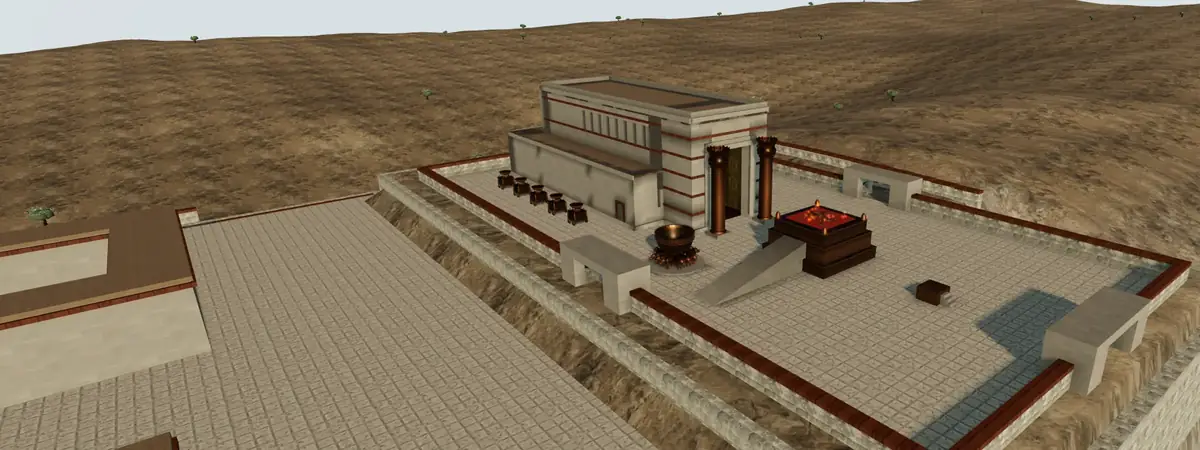
Teach with the Labs
Teach mode turns a 3D lab into something you can put on the big screen for Sunday school, a small group or a classroom: large captions, the keys of a presentation clicker, and notes on your own screen that the room doesn't see.
Labs you can teach with
The Tabernacle
From the camp of Israel to the mercy seat, 25 stops, about 45 minutes. Good for Exodus 25–40 and Hebrews 9–10.
Open in teach mode →Open the labPrintable sheet40-second video (MP4, 3.3 MB)
Holy Week
Palm Sunday to the empty tomb, 19 stops, about 50 minutes. Good for Lent, Holy Week and Easter.
Open in teach mode →Open the labPrintable sheet40-second video (MP4, 2.4 MB)
Bethlehem (Places of Jesus)
The road, the house, the shepherds, the Temple, the magi and the flight to Egypt, 13 stops, about 30 minutes. Good for Advent and Christmas.
Open in teach mode →Open the labPrintable sheet40-second video (MP4, 3.4 MB)
Noah's Ark
The story of Genesis 6–9 from God's command to the rainbow, with the ark's outside and its three decks along the way, 25 stops, about 45 minutes. Good for Genesis 6–9 and for children's classes.
Open in teach mode →Open the labPrintable sheet40-second video (MP4, 3.0 MB)
Hezekiah's Tunnel
From the Gihon spring through the tunnel to the Pool of Siloam, 10 stops, about 25 minutes. Good for 2 Kings 18–20, 2 Chronicles 32 and Isaiah 22.
Open in teach mode →Open the lab40-second video (MP4, 2.6 MB)
Solomon's Temple
From the courts past Jachin and Boaz into the holy place and the most holy place, 24 stops, about 40 minutes. Good for 1 Kings 6–8 and 2 Chronicles 3–5.
Open in teach mode →Open the labPrintable sheet40-second video (MP4, 3.8 MB)
The Exodus
Passover night, the sea, the wilderness and Sinai, 22 stops, about 40 minutes. Good for Exodus 12–20 and for Passover and Easter.
Open in teach mode →Open the labPrintable sheet40-second video (MP4, 2.9 MB)
Jerusalem Through the Ages
One city in seven eras, from David to today, 7 stops, about 25 minutes. Good for an overview of the Bible's history.
Open in teach mode →Open the labPrintable sheet40-second video (MP4, 2.3 MB)
Paul's Roads
From Damascus to Rome on one map, 14 stops, about 35 minutes. Good for Acts 9–28 and Paul's letters.
Open in teach mode →Open the labPrintable sheet40-second video (MP4, 3.0 MB)
The Priests' Garments
The high priest dressed layer by layer in the order of Leviticus 8, then the priests and the Day of Atonement, 12 stops, about 30 minutes. Good for Exodus 28, Leviticus 8 and 16, and Hebrews 4–9.
Before class: fifteen minutes
- Open the lab on the laptop you will use in class, press “Teach this” and walk the whole tour once. The first visit downloads the 3D scene; after that it opens quickly.
- Press S to open the presenter notes. For every stop they give you something to say, the passage to read, a question for the group, and how sure we can be about what's on screen.
- Short on time? Choose four or five stops. In class, type a stop's number and press Enter to jump straight to it.
- If you want the notes on your laptop while the lab is on the projector, set the display to extend rather than mirror, and drag the notes window onto the laptop screen.
In class: look, read, ask
Press F (or the clicker's start button) for full screen. The title slide stays up until you press Next, so you can greet people first.
A good rhythm for each stop: let the room look for a few seconds before you speak; read the passage; ask one question and wait for answers. Press V to put the key verse on the screen while you read.
When the conversation starts, press B to black out the screen so eyes come back to each other. Press B again, or Next, to bring the picture back.
Say how sure we are
Every lab marks its details: what the text states, what is strongly supported, what is a plausible reconstruction, what is a guess, and what is simply an artist's choice. The notes repeat this for each stop.
Saying it out loud (“Exodus gives us these measurements; the colour of the outer covering is our guess”) builds trust, and it teaches people to read the Bible carefully for themselves. Where Christians disagree, as over the site of Golgotha, show the options and let the group weigh them.
Older laptops and projectors
Teach mode starts in classroom quality: lighter models and a lower pixel ratio, which most church laptops handle smoothly and which looks fine on a projector. If your laptop is strong, press Q for full quality; it remembers your choice.
Nothing to sign up for
Teach mode needs no account and records nothing about you or your class. The notes window talks to the lab only inside your own browser.